
1382 字
5 分钟阅读
Vue – v-show

简介
Vue vshow
代码演示
<html>
    <head>
        <title>Vue v-show</title>
        <style>
            table, th, td {
                border: 1px solid black;
                width: 500px;
                text-align: center;
            }
            table {
                border-collapse: collapse;
            }
        </style>
    </head>
    <body>
        <div id = "app">
            <table>
                <thead>
                    <th>ID</th>
                    <th>头像</th>
                    <th>姓名</th>
                    <th>年龄</th>
                    <th>成绩</th>
                    <th>评级</th>
                </thead>
                <tbody>
                    <tr v-for="emp in empList" :key = "emp.id">
                        <td>{{emp.id}}</td>
                        <td><img v-bind:src = "emp.img" :alt = "emp.name" width="50px"></td>
                        <td>{{emp.name}}</td>
                        <td>{{emp.age}}</td>
                        <td>{{emp.score}}</td>
                        <td>
                            <!-- v-show 控制元素是否显示 -->
                            <!-- 语法: v-show = "条件表达式" -->
                            <!-- 表达式为 true 时显示 false 时隐藏 -->
                            <!-- 适用于频繁切换是否显示的元素 -->
                            <!-- 与 v-if 区别在于 v-show 表达式为 false 是用CSS隐藏对应元素 -->
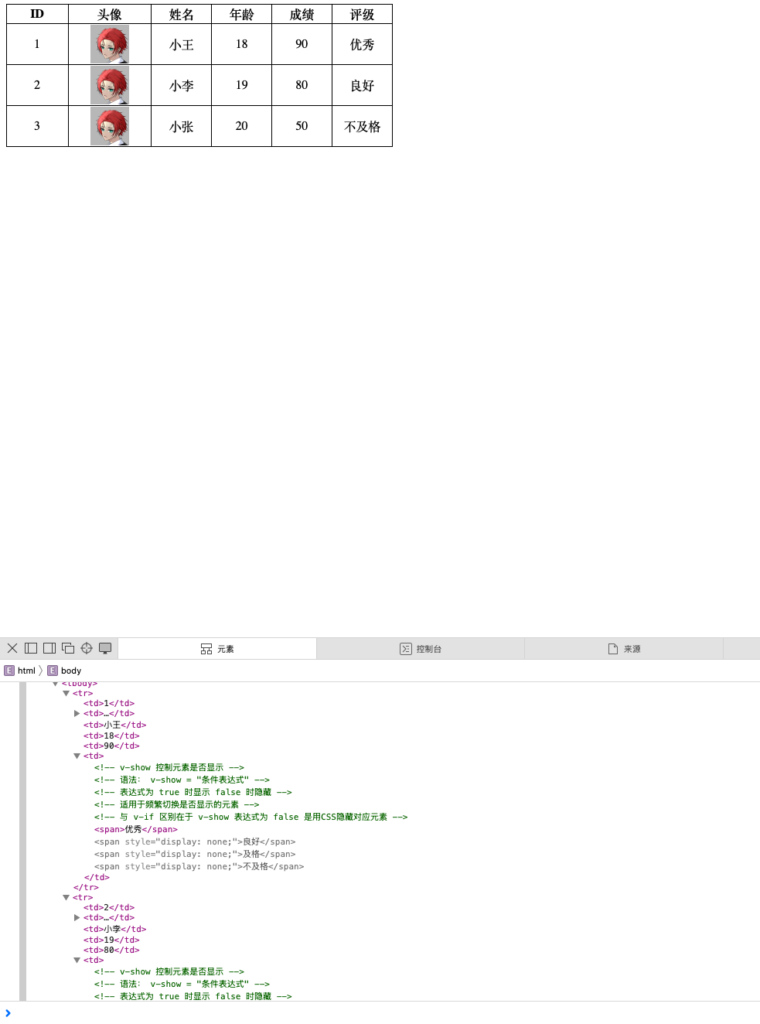
                            <span v-show = "emp.score >= 90 ">优秀</span>
                            <span v-show = "emp.score >= 70 && emp.score < 90">良好</span>
                            <span v-show = "emp.score >= 60 && emp.score < 70">及格</span>
                            <span v-show = "emp.score < 60">不及格</span>
                        </td>
                    </tr>
                </tbody>
            </table>
        </div>

        <script type="module">
            import { createApp, ref } from 'https://unpkg.com/vue@3/dist/vue.esm-browser.js'
                createApp({
                    data(){
                        return {
                            empList: [
                                {
                                    id: 1,
                                    img: "http://blog.zqat.top/wp-content/uploads/2025/05/cropped-b_4661cf5da8cf1caafe9574a52f3f9430.jpg",
                                    name: '小王',
                                    age: 18,
                                    score: 90
                                },
                                {
                                    id: 2,
                                    img: "http://blog.zqat.top/wp-content/uploads/2025/05/cropped-b_4661cf5da8cf1caafe9574a52f3f9430.jpg",
                                    name: '小李',
                                    age: 19,
                                    score: 80
                                },
                                {
                                    id: 3,
                                    img: "http://blog.zqat.top/wp-content/uploads/2025/05/cropped-b_4661cf5da8cf1caafe9574a52f3f9430.jpg",
                                    name: '小张',
                                    age: 20,
                                    score: 50
                                }
                            ]
                        }
                    }
                }).mount('#app')
        </script>
    </body>
</html>
效果