
1679 字
6 分钟阅读
Ajax – axios

简介
Ajax axios
代码演示
<html>
    <head>
        <title>Ajax</title>
        <style>
            table {
                border-collapse: collapse;

            }
            th, td {
                border: 1px solid black;
                width: 50px;
                text-align: center;
            }
        </style>
    </head>
    <body>

        <div id = "app">

            <button @click = "getdata">获取1</button>
            <button @click = "getdata2">获取2</button>
            <button @click = "getdata3">获取3</button>
            <button @click = "clear">清空</button>
            <br>
            <br>
            <table>
                <thead>
                    <th>ID</th>
                    <th>姓名</th>
                    <th>性别</th>
                </thead>
                <tbody>
                    <tr v-for="emp in empList" :key = "emp.id">
                        <td>{{emp.id}}</td>
                        <td>{{emp.name}}</td>
                        <td>
                            <span v-if = "emp.gender == 1">男</span>
                            <span v-if = "emp.gender == 2">女</span>
                        </td>
                    </tr>
                </tbody>
            </table>
        </div>

        <!-- 引入 axios -->
        <script src="https://unpkg.com/axios/dist/axios.min.js"></script>

        <script type="module">
            import { createApp, ref } from 'https://unpkg.com/vue@3/dist/vue.esm-browser.js'
                createApp({
                    data(){
                        return {
                            empList: []
                        }
                    },
                    methods: {
                      getdata(){
                        // ajax axios get 请求
                        // .then() 是成功的回调函数
                        // .catch() 是失败的回调函数
                        axios.get("https://web-server.itheima.net/emps/list").then((res) => {
                            this.empList = res.data.data;
                        }).catch((err) => {
                            console.log(err);
                        });
                      },
                      getdata2(){
                        // ajax axios post 请求
                        // .then() 是成功的回调函数
                        // .catch() 是失败的回调函数
                        // post() 后可添加更多参数 例如 "id=1";
                        // axios.post(`https://web-server.itheima.net/emps/list?gender=1`,"id=1").then((res) => {
                        //     this.empList = res.data.data;
                        // }).catch((err) => {
                        //     console.log(err);
                        // });
                        axios.get(`https://web-server.itheima.net/emps/list?gender=1`).then((res) => {
                            this.empList = res.data.data;
                        }).catch((err) => {
                            console.log(err);
                        });
                      },
                      // 异步函数
                      async getdata3(){
                        // await 等待异步函数执行完毕 并将获取到的结果赋值给变量
                        let res = await axios.get(`https://web-server.itheima.net/emps/list?gender=2`);
                        this.empList = res.data.data;
                      },
                      clear(){
                        this.empList = [];
                      }
                    },
                    // ajax 生命周期
                    // 挂载成功到对应标签之后,会自动调用 mounted() 方法
                    mounted(){
                        this.getdata();
                    }
                }).mount('#app')
        </script>
        <script>
        </script>
    </body>
</html>
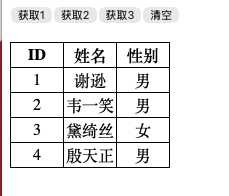
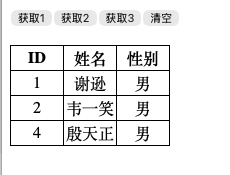
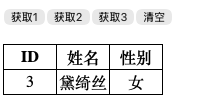
效果