

397 字
2 分钟阅读
html – 段落

简介
html段落
代码演示
<html>
    <head>
        <title>html 段落</title>
        <style>
            p {
                /* 首行缩进 */
                text-indent: 2;
                /* 设置行高 */
                line-height: 1.8;
            }
        </style>
    </head>
    <body>
        <!-- p 段落标签 会自动换行 -->
        <p>这是一个段落</p>
        <!-- strong 加粗标签 加粗字 -->
        <p><strong>这几个字</strong>被加粗了</p>
        <!-- ins 下划线标签 给字加一个下划线 -->
        <p><ins>这几个字</ins>有下划线</p>
        <!-- ins 倾斜标签 把字倾斜 -->
        <p><em>这几个字</em>倾斜了</p>
        <!-- del 删除线标签 在字上添加删除线 -->
        <p><del>这几个字</del>没用了</p>
    </body>
</html>
效果
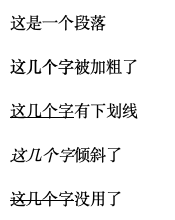
CSS 控制
text-indent:设置首行缩进
line-height:设置行高
[…] 段落 跳转 […]