
629 字
3 分钟阅读
Javascript – JSON

简介
Javascript JSON
代码演示
<html>
    <head>
        <title>Javascript JSON</title>
    </head>
    <body>
        <script>
            let person = {
                name: '张三',
                age: 18,
                sex: '男',
                show() {
                    console.log(this.name + ' ' + this.age + ' ' + this.sex);
                },
                show2() {
                    console.log(this.name + ' ' + this.age);
                }
            }
            // JSON 对象 包含
            // 1. JSON.stringify() 方法 用来把对象转换成 JSON 字符串
            // 2. JSON.parse() 方法 用来把 JSON 字符串转换成对象

            // 1. JSON.stringify() 方法 用来把对象转换成 JSON 字符串
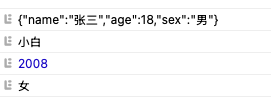
            console.log(JSON.stringify(person));

            // JSON格式的文本所有的 key 必须使用双引号引起来
            // 其余和JS对象语法一样
            let jsonstr = '{"name":"小白","brith":2008,"sex":"女"}';

            // 2. JSON.parse() 方法 用来把 JSON 字符串转换成对象
            let person2 = JSON.parse(jsonstr);
            console.log(person2.name);
            console.log(person2.brith);
            console.log(person2.sex);
        </script>
    </body>
</html>
效果